Sunday, May 31, 2009


Wednesday, May 27, 2009
Week 5 - Night/Light Photos
I love night photography!!!
Star Trails
Star Trails


Camera Info:
Highway Night: Nikon D50; Shutter Speed: 10 mins; F stop: 4.0; No Flash; Date:5/22/09; Beaver Dick Park - Madison County - ID
Country Night: Nikon D50; Shutter Speed: 12 mins; F stop: 4.0; No Flash; Date: 5/25/09; Dry Farms - Madison County - ID
Fire & Lights


Camera Info:
Fire: Nikon D50; Shutter Speed: 1/125; F stop: 4.8; No Flash; Date:5/22/09; Beaver Dick Park - Madison County - ID
Lights: Nikon D50; Shutter Speed: 15 sec; F stop: 4.0; No Flash; Date:5/22/09; Beaver Dick Park - Madison County - ID (White lights - car head lights; Blue lights - glow-in-the-dark frisbee; camera on tripod - turned camera to get more light action)
Other Night Shots


Camera Info:
Moon: Nikon D50; Shutter Speed: 1/3; F stop: 5.6; No Flash; Date:5/30/07; Temple grounds - Laie - Oahu - Hawaii
Night Tree: Nikon D50; Shutter Speed: 25 sec; F stop: 14.0; No Flash; Date: 6/14/07; BYU-Hawaii Campus - Laie - Oahu - Hawaii (light source - street lamps)
Night Scene: Nikon D50; Shutter Speed: 2.5 mins; F stop: 6.3; No Flash; Date 11/4/06; Hibbard-Rexburg ID
Like I said - I love night photography - to see more of my night photography - click on the link below
MORE NIGHT PHOTOS
Week 5 - Edge Effects


Camera Info
Caterpillar: Nikon D50; Shutter Speed 1/60; F stop: 5.6; Flash On; Date: 6/13/08; Big Springs Camp - Provo Canyon - UT
Double Border
- Add rectangle shape (white - make sure Shape Layer is selected in top left corner) inside the image - leaving a little so you can still see the image
- Add a mask to the image
- Add rectangle shape (black - make sure Fill Pixels is selected in top left corner) on mask just a bit inside the white rectangle - leaves a "hole" in the center of the white rectangle showing the image underneath
- Reduce Opacity of rectangle layer (50% or so)
- Add filter - motion blur - Angle: 0 - Distance 45 px
- Add filter - motion blur - Angle: 90 - Distance 45 px
Bryce Canyon: Nikon D50; Shutter Speed: 1/800; F stop: 8.0; No Flash; Date: 5/19/06; Bryce Canyon - UT
Brush On Effect
- Open edited image
- Add new layer (Shift - Command - n)
- Set default colors (black = foreground - white = background)
- Fill layer with white (Command-delete)
- Add a black layer (Alt - click on mask)
- Use brush tool - thick heavy brushes at different opacities
- Changed the white layer to dark green pulled from the photo
Big Springs Waterfall: Nikon D50; Shutter Speed: 1 sec; F stop 27; No Flash; Date 6/13/08; Big Springs Camp - Provo Canyon - UT
Sprayed Edge Effect
- Rectangle Marquee inside the photo leaving at least half an inch around each edge
- Apply Quick Mask (Command q)
- Choose filter - Brush strokes - Spatter (can use sprayed strokes) Increase radius and length to get best effect
- Get rid of Quick Mask (q)
- Select Inverse (Command - Shift - i)
- Choose background color from the image
- Fill selection with background color (delete)
- To add more border: Image - Canvas Size - add as much as you want - make sure to apply the correct color
Flip Flops: Nikon D50; Shutter Speed: 1/3200; F stop: 4.5; No Flash; Date: 7/7/06; Beach near San Diego CA
Brush On Effect
- Open edited image
- Add new layer (Shift - Command - n)
- Set default colors (black = foreground - white = background)
- Fill layer with white (Command-delete)
- Add a black layer (Alt - click on mask)
- Use brush tool - square brushes at different sizes and opacities
- Changed the white layer to dark blue from photo - combined the layers using the multiply option
Tuesday, May 26, 2009
Two Choices
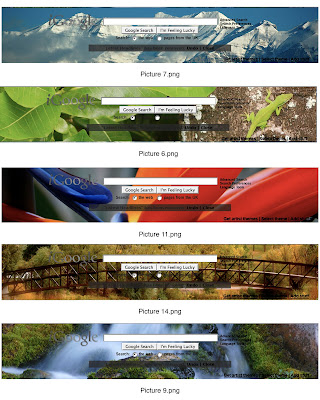
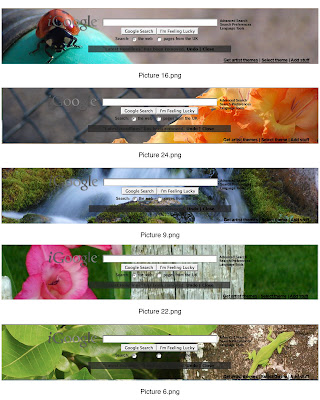
I really need some help - I like both number 4 and number 8 of the contact sheets! I need to know what people's votes are!!! We are going for sets here - not specific photos. I only picked photos I really liked and felt comfortable sharing with the world - so the issue is not which photos are best but rather what set fits together the best.
#4
#8
#4

#8

Friday, May 22, 2009
igoogle contest
OK - this has nothing to do with custom images - but I thought if I posted on this blog perhaps I would be able to get some feedback from classmates. Here's the thing - igoogle is having a contest to create themes - using photographs. So I went through my photos and found my favorites that could be cropped to the right size. Each theme has to have 5 photos that fit together somehow (this doesn't necessarily have to be a theme you can name - but just so long as they all look like they fit together.)
I have uploaded 7 of my favorite sets of 5. If you like one of these sets a lot please let me know. If you part of the set but not all the photos let me know that. If you see another one from a different set that you think would fit well let me know! I just want to know your opinions! There is no right or wrong answer!
Each set has a number at the top (example - ContactSheet001) If you like one of the sets that how you can let me know which number you like best. Each photo also has a caption (underneath) that says what number it is (example - picture1.png) if you want to let me know which photos you like best that would be helpful!
Thanks for your help!
I have uploaded 7 of my favorite sets of 5. If you like one of these sets a lot please let me know. If you part of the set but not all the photos let me know that. If you see another one from a different set that you think would fit well let me know! I just want to know your opinions! There is no right or wrong answer!
Each set has a number at the top (example - ContactSheet001) If you like one of the sets that how you can let me know which number you like best. Each photo also has a caption (underneath) that says what number it is (example - picture1.png) if you want to let me know which photos you like best that would be helpful!
Thanks for your help!
Click on photos to enlarge


Subscribe to:
Posts (Atom)